Instant Access
Your Spinsup account gives you immediate access to 7,000+ pokies, live Evolution Gaming tables and your AUD balance the moment you sign in.
Login at Spinsup: Access via PWA
Access your account in seconds using your email and password, or add the PWA shortcut to your home screen for one-tap sign-in on any device.
Keeping Your Account Secure
What You Should Do
What You Should Avoid
Your Account at a Glance
Instant Access
Your Spinsup account gives you immediate access to 7,000+ pokies, live Evolution Gaming tables and your AUD balance the moment you sign in.
Two-Factor Authentication
Enable 2FA from your account settings after logging in to add a second layer of verification, protecting your AUD balance and personal details.
Mobile Sign-In
The full login flow works in any mobile browser on iOS and Android. Add the PWA shortcut to your home screen and you sign in with a single tap.
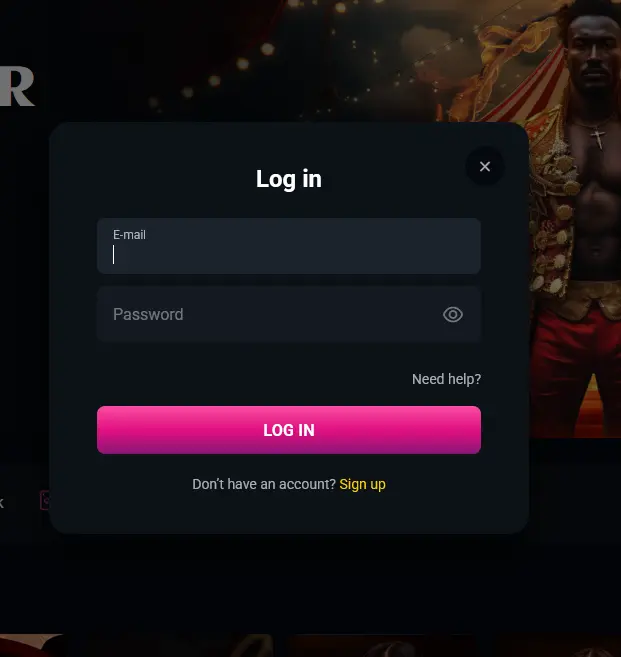
Spinsup Casino uses a standard email-and-password login that works on every device, in every major browser, without a download or plugin. There are two ways to reach the sign-in screen: navigate directly to spinsupslots.com and click the Login button in the top-right corner, or tap the home-screen shortcut if you have already installed the PWA.
The platform also supports two-factor authentication, which sends a verification code to your registered device after you enter your password. Activating 2FA from your account settings is the single most effective step you can take to prevent unauthorised access to your AUD balance and bonus funds.
Signing in to Spinsup takes under thirty seconds once your account is verified. The process is identical whether you access via a browser on a PC, a tablet, or your phone.
Open any major desktop browser and navigate to spinsupslots.com. Click the Login button at the top right. Enter the email address you registered with and your password, then click Sign In. If 2FA is active, enter the code from your authenticator app or SMS when prompted. Your account dashboard, cashier and the full game lobby load immediately after authentication.
Open Safari on iOS or Chrome on Android and navigate to spinsupslots.com. The site detects your screen size and loads the mobile-optimised layout automatically. Tap Login in the top navigation, enter your credentials, and tap Sign In. If you have not yet added the PWA shortcut, the browser will prompt you to do so after signing in, which places a Spinsup icon on your home screen for future one-tap access.
Spinsup does not offer a native downloadable app via the App Store or Google Play. Instead, the PWA (Progressive Web App) shortcut installed from your mobile browser provides the same functionality: tap the Spinsup icon on your home screen, and the sign-in screen loads immediately without opening a separate browser window.
Your Spinsup account holds your AUD balance, bonus funds, loyalty points and personal verification documents, making it worth protecting with the same care you would give a financial account.
Two-factor authentication (2FA) is available from your account settings and can be activated immediately after your first login. Once enabled, every sign-in requires both your password and a time-limited code, which means a compromised password alone is not enough for an attacker to access your account.
Dama N.V. protects all connections to Spinsup with 128-bit SSL encryption, ensuring that your credentials and session data are never transmitted in plain text.
Several situations can prevent a successful sign-in, and most are resolved in under a minute.
If you cannot remember your password, click Forgot Password on the login screen and submit your registered email address. A reset link will arrive in your inbox, typically within a couple of minutes. Spam and promotions folders are worth checking if it does not appear in your primary inbox.
If you receive an “account not found” error, confirm you are entering the exact email address used during registration. Multiple email accounts are a common source of this confusion.
If your account has been temporarily suspended after repeated failed login attempts, contact support via live chat or email [email protected] to have the hold reviewed. The team operates 24/7 and can respond quickly across Australian time zones (AEST/AEDT).
If you cannot access your 2FA code because you have changed devices or lost access to your authenticator app, contact support with your account details and identity verification documents. The team will guide you through the account recovery process in line with Dama N.V.’s KYC procedures.
Browser-side issues such as cached login pages or expired cookies can also cause problems. Clearing your browser cache, disabling extensions or trying an alternative browser usually resolves these quickly.
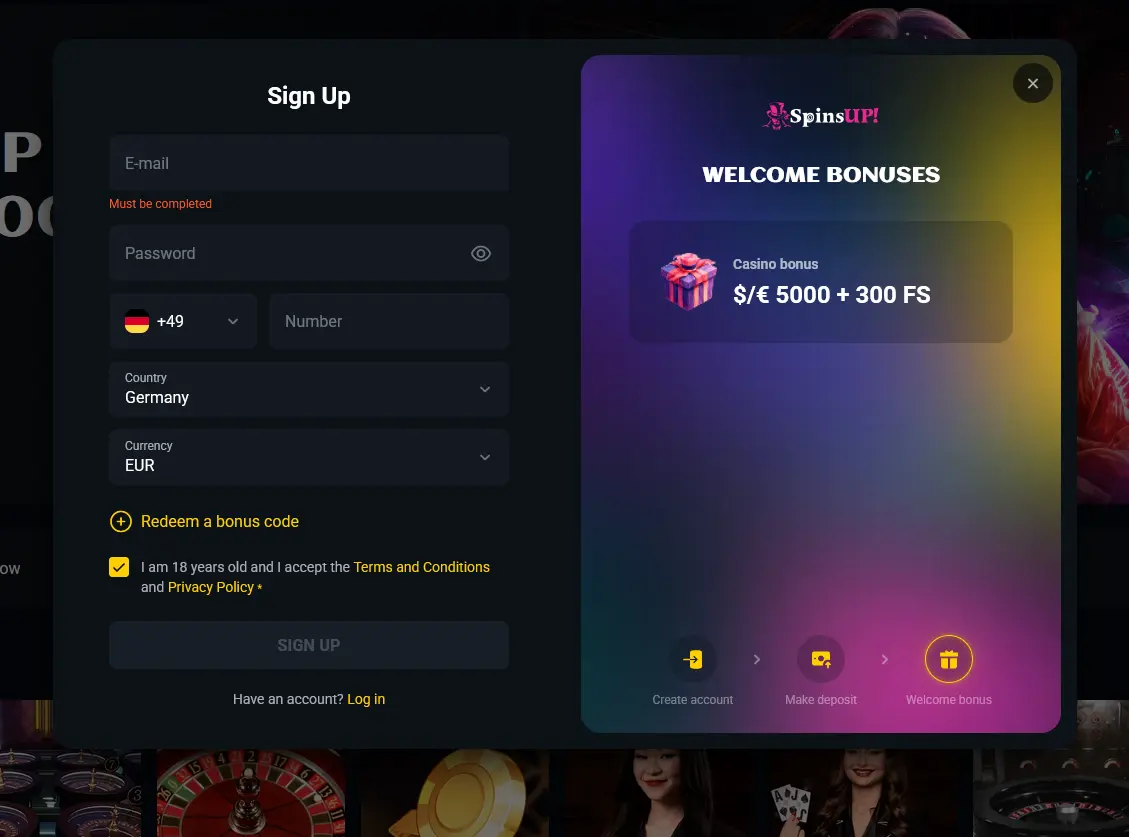
Registration at Spinsup is straightforward. You provide your name, date of birth, email address and a password, confirm the link sent to your inbox, and the lobby is open. Select AUD as your account currency during sign-up, as this setting is permanent once the account is created. Full KYC verification, using a government-issued photo ID and a proof of address document, is required before your first withdrawal is processed, so completing it early avoids delays when you request a payout. Once your account is active, the $5,000 welcome package across your first four deposits is available to claim.
Login Questions Answered
Click the Forgot Password link on the login screen, enter your registered email address, and follow the reset instructions sent to your inbox. The reset link expires after a short window, so use it promptly.
Spinsup temporarily locks an account after multiple unsuccessful sign-in attempts as a security measure. Contact the support team via live chat or email [email protected] to have the lock reviewed and removed.
Yes. The full Spinsup login experience runs in any iOS 12+ or Android 8.0+ mobile browser without a download. You can also add a PWA home-screen shortcut for faster one-tap access.
Sign In and Play
Grab 100% up to A$5,000 and 300 free spins.
Enter Casino Play responsibly. Registration is restricted to players 18 years and older. Bonus offers carry separate terms and conditions.