Android
- Minimum OS: Android 8.0 (Oreo) or later
- Recommended browser: Chrome 90 or later
- Installation: Add to home screen via Chrome menu after visiting spinsupslots.com
Everything About the App at Spinsup
The full Spinsup Casino experience runs in your mobile browser on iOS and Android. Add the PWA shortcut to your home screen and every spin, deposit and withdrawal is one tap away.
The full Spinsup Casino experience runs in your mobile browser on iOS and Android. Add the PWA shortcut to your home screen and every spin, deposit and withdrawal is one tap away.
The full Spinsup Casino experience runs in your mobile browser on iOS and Android. Add the PWA shortcut to your home screen and every spin, deposit and withdrawal is one tap away.
Open on Mobile Play responsibly. Registration is restricted to players 18 years and older. Bonus offers carry separate terms and conditions.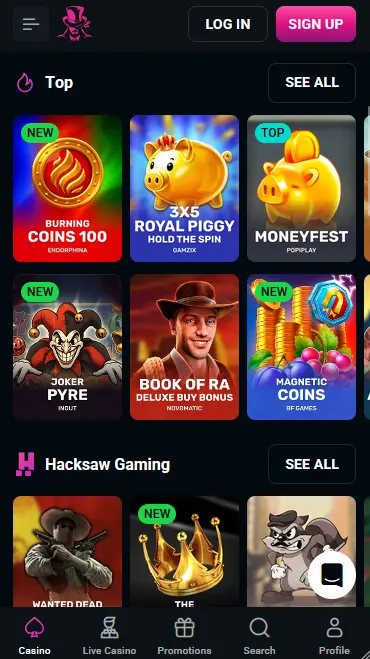
How to Get the Spinsup PWA on Your Device
Device Requirements
Android
iOS
Staying Safe on Mobile
What You Should Do
What You Should Avoid
What Makes the Spinsup Mobile Experience Work
Browser-Based PWA
No App Store or Google Play installation is needed. The PWA loads the complete Spinsup lobby directly in your mobile browser, with a home-screen shortcut for one-tap access on any device.
Instant PayID Deposits
Fund your AUD account via PayID in under two seconds directly from the mobile cashier. Cryptocurrency deposits and MiFinity are also processed instantly, so you never miss a session.
2FA and SSL Security
Enable two-factor authentication from your account settings and benefit from 128-bit SSL encryption on every transaction and login, whether you are on Wi-Fi or a mobile data connection.
Mobile at Spinsup: Honest Assessment
Pros
Cons
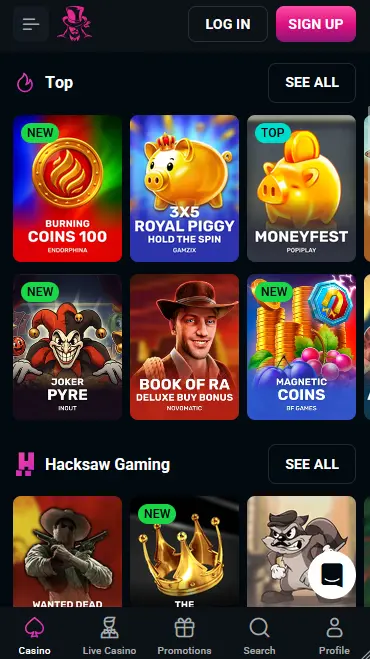
The Spinsup mobile experience delivers the complete casino lobby through an HTML5-optimised site that runs in any modern mobile browser. There is no difference in game availability between the desktop and mobile versions: all 7,000+ titles, the full cashier and every bonus are accessible on screen sizes from small smartphones up to large tablets.
The live chat support button is present on every page of the mobile site, meaning help is always one tap away without leaving a game. The cashier is fully functional from mobile, supporting PayID, Neosurf, Visa, Mastercard, MiFinity, cryptocurrency and bank transfer deposits and withdrawals in AUD. All promotions, including weekly reload codes such as TUESDAY and THURSDAY, can be entered directly in the mobile cashier.
The PWA home-screen shortcut removes the browser address bar and navigation controls, creating a full-screen experience that is visually identical to a native app. Loading times after the initial shortcut installation are marginally faster than opening a browser tab from scratch. On iOS devices running Safari, the PWA also gains push-notification capability if the player grants permission after installation.
Getting Spinsup on your phone requires no app store and no file download. The process takes under two minutes on either platform.
Open Chrome on your Android device and navigate to spinsupslots.com. The mobile site loads automatically. Tap the three-dot menu icon in the top-right corner of Chrome. Select Add to Home Screen from the menu. A prompt appears showing the Spinsup icon and name; tap Add to confirm. The shortcut appears on your home screen immediately and can be moved to any position or folder. Tap it to launch the PWA in full-screen mode and sign in to begin playing.
Open Safari on your iPhone or iPad and navigate to spinsupslots.com. The Safari browser is required for the Add to Home Screen function on iOS; Chrome and other browsers on iOS do not support PWA installation. Tap the Share icon, which appears as a box with an upward-pointing arrow at the bottom of the screen. Scroll through the share sheet until you find Add to Home Screen and tap it. Edit the shortcut name if you wish, then tap Add in the top-right corner. The Spinsup icon appears on your home screen alongside your other apps. Tap it to open the PWA in full-screen mode.
If you prefer not to install the home-screen shortcut, you can bookmark spinsupslots.com in any mobile browser and access the full site from there. All features work identically; the only difference is that the browser interface (address bar and navigation controls) remains visible.
The complete Spinsup game catalogue is available through the mobile browser without any game-by-game differences in rules, RTP or bonus features compared to the desktop version.
The pokies section is fully playable on mobile, including high-volatility titles such as Gates of Olympus and Sweet Bonanza (Pragmatic Play), bonus-buy pokies from Nolimit City and Hacksaw Gaming, and classic titles like Book of Dead and Legacy of Dead (Play’n GO). Progressive jackpot pokies from Pragmatic Play and Playtech are also included, with jackpot amounts updating in real time on mobile.
Evolution Gaming live tables, including Blackjack Live, Auto Roulette, No Commission Baccarat and XXXTreme Lightning Roulette, stream in high definition on mobile data as well as Wi-Fi. The touch interface is optimised for placing bets on live tables with minimal input friction. Ezugi live tables are also available.
Standard blackjack, roulette, baccarat and poker variants in their non-live digital formats load quickly on mobile due to the HTML5 architecture and do not require a minimum connection speed beyond standard 4G.
The jackpot pokie section is accessible from the mobile lobby and lists all progressive jackpot titles with their current prize pool values displayed on the game thumbnail, allowing players to browse active jackpots before selecting a game.
The Spinsup PWA relies entirely on the device’s installed browser and operating system, so no proprietary hardware is required.
Android 8.0 (Oreo) is the stated minimum, which covers all Android phones and tablets released from approximately 2017 onwards. Chrome is the recommended browser for Android because it supports the full PWA installation flow, including the Add to Home Screen prompt and push notifications.
iOS 12 is the minimum version required, covering iPhone 5s and all later iPhone and iPad models that can run iOS 12. Safari is required for PWA installation on iOS. The full game catalogue, cashier and live streaming all function on iOS 12 and above, though iOS 15+ is recommended for the smoothest live dealer streaming experience.
| Platform | Min OS | Recommended Browser | Installation Method |
|---|---|---|---|
| Android | Android 8.0 | Chrome 90+ | Add to Home Screen via Chrome menu |
| iOS | iOS 12 | Safari | Add to Home Screen via Share sheet |
New players can register directly from the mobile browser or PWA. Tap the Register button on the Spinsup landing page and enter your name, date of birth, email address and a chosen password. Select AUD as your account currency at this step, since the currency cannot be changed after registration. Confirm the verification email that arrives in your inbox, and your account is immediately active. The welcome package across your first four deposits is available to claim as soon as your account is verified and your first $30 AUD minimum deposit is confirmed.
Returning players tap Login on the Spinsup homepage, enter their registered email and password, and complete 2FA if it is enabled on the account. On devices that support biometric authentication at the browser level (Face ID on iPhone, fingerprint on Android), the browser may offer to autofill credentials, speeding up the sign-in process on return visits. If you encounter sign-in issues on mobile, see the full troubleshooting guide at the Spinsup login page.
All payment methods available on the desktop version are also available through the mobile cashier in AUD.
| Method | Type | Min Deposit | Processing Time |
|---|---|---|---|
| PayID | Instant bank transfer | $30 | Under 2 seconds |
| Neosurf | Prepaid voucher (deposit only) | $30 | Instant |
| Visa / Mastercard | Card | $30 | Instant |
| MiFinity | E-wallet | $30 | Instant |
| Bitcoin (BTC) | Cryptocurrency | $30 equiv. | 10-30 min (chain confirm.) |
| Ethereum (ETH) | Cryptocurrency | $30 equiv. | Under 10 min |
| Bank Transfer | Bank | $30 | Up to 10 business days |
Crypto withdrawals are credited to your wallet within hours of approval. MiFinity withdrawals are near-instant. PayID withdrawals are processed on the same rails as PayID deposits, typically settling within minutes once the casino’s cashier team approves the request. Bank transfer withdrawals take the longest, up to ten business days.
All transactions through the Spinsup mobile cashier are protected by 128-bit SSL encryption. Payment method verification may be required as part of the KYC process: for card payments, you may be asked to upload a photo of the front of the card (showing the first six and last four digits), and for e-wallet accounts, confirmation of account ownership may be requested before the first withdrawal is approved.
Every page of the Spinsup mobile site, including the game lobby, cashier and account settings, is served over a secure HTTPS connection protected by 128-bit SSL. No data transmitted between your device and the Spinsup server is readable in plain text.
Two-factor authentication is available from your account settings and can be enabled on your first visit. Once active, every login from any device, including mobile, requires both your password and a time-limited code. This protects your AUD balance and bonus funds even if your password is compromised.
Biometric sign-in at Spinsup is managed through the browser’s native credential management rather than a standalone app. On iOS Safari, Face ID or Touch ID can be used to autofill saved passwords. On Android Chrome, fingerprint or face unlock may be offered depending on your device settings. Enabling your device’s screen lock ensures that the biometric shortcut cannot be bypassed without physical access.
The full $5,000 welcome package is available through the mobile PWA. Make a minimum $30 AUD deposit via PayID or another available method in the mobile cashier. The first deposit bonus (100% match up to $1,000 + 100 free spins) is applied automatically with no code required. Enter the codes SPINSUP2, SPINSUP3 and SPINSUP4 in the mobile cashier for your second, third and fourth qualifying deposits to claim the remaining stages of the welcome offer. All terms, including the 40x wager, 3-day validity and $5 maximum bet during wagering, apply equally to mobile play. 18+, T&Cs apply.
For the full breakdown of all bonus terms, wagering conditions and the weekly promo calendar, visit the complete Spinsup bonus page.
The live chat widget is accessible on every page of the Spinsup mobile site and PWA. Tapping it opens a chat window where an initial chatbot handles common queries, with the option to escalate to a human agent around the clock. Email support is available at [email protected] for matters that do not require an immediate response. Response times via live chat are typically three to five minutes, and the team is staffed across Australian time zones (AEST/AEDT).
Deposit limits, loss limits, wager limits and session time limits can all be set through the account settings panel accessible from the mobile menu. A cooling-off period or permanent self-exclusion can be requested by contacting support. These tools apply across all devices and sessions, so a limit set on mobile is also enforced on desktop.
Mobile App Questions Answered
No. Spinsup Casino does not currently offer a native downloadable app via the App Store or Google Play. The platform is available as a PWA installed from the mobile browser, which provides the same one-tap access and full feature set.
The Spinsup PWA requires Android 8.0 or later with Chrome, or iOS 12 or later with Safari. Most smartphones released from 2018 onwards meet these requirements without any updates needed.
Yes. The full bonus system, including free spins on Book of Dead, Mystery Joker and Legacy of Dead (Play'n GO), is available through the mobile PWA. Deposit using PayID or Neosurf from the mobile cashier and the bonus is applied automatically for the first deposit.
Add Spinsup to Your Home Screen
Grab 100% up to A$5,000 and 300 free spins.
Enter Casino Play responsibly. Registration is restricted to players 18 years and older. Bonus offers carry separate terms and conditions.